OpenSnow
Cloudnine Weather, Inc.Weather
4.31.28K Reviews
- Version
- 7.4.0
- Installs
- 100.00K
- Age Rating
- Everyone
Screenshots
Our Review of OpenSnow
 Analysis by Appyee
For anyone who plans a day around snow, the hardest part is often not choosing a mountain; it’s deciding whether the forecast is trustworthy enough to commit. A general weather app can tell me that precipitation is likely, but that doesn’t always answer the practical question: is a ski day worth the drive, or should I wait? OpenSnow is built around that winter-specific decision. I find it most useful when I treat it as a planning aid rather than a promise that conditions will unfold exactly as forecast.
When a general forecast leaves too much guesswork
Snow changes plans quickly. A small shift in temperature can affect whether precipitation falls as snow, and wind can make an otherwise appealing day less comfortable. For people who ski, snowboard, or simply need to anticipate winter weather, a broad forecast may leave out the details that matter most. OpenSnow’s focus on snowfall and mountain conditions gives those questions more room than I usually get from an all-purpose weather screen.
That focus is also the main reason I would choose it over a standard weather app. I wouldn’t necessarily replace my everyday forecast tool if I mainly want to know whether to carry an umbrella or take a jacket. But if I’m deciding when to drive toward the mountains, checking several snowy destinations, or following a storm, a snow-centered view is a more natural fit. The useful distinction is not that one kind of forecast is always right and another wrong; it’s that OpenSnow organizes information around a different decision.
Getting to a useful first check
After installing it, I’d begin by saving the places I actually care about: a home area, a regular resort, and perhaps one alternative destination. That keeps a quick check focused. If every location I might visit is added at once, the app can become another feed to browse instead of a tool that helps me choose. A short list makes comparisons more meaningful and cuts down the time spent hunting through locations when the weather is changing.
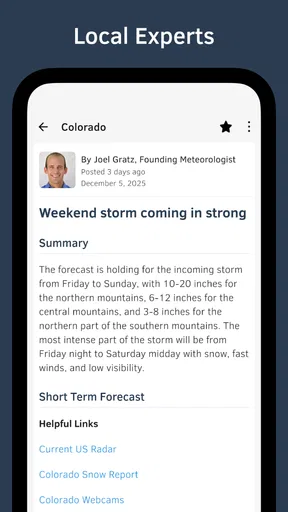
The local forecast perspective is valuable when I need interpretation, not just a number. A forecast is easier to act on when it explains how a weather pattern could affect the area, rather than leaving me to infer everything from a snowfall estimate. I’d still treat any prediction as a forecast, especially when plans depend on a particular time window. Checking again before leaving is a sensible habit; it is more useful than reading one forecast several days ahead and assuming it will hold.
Putting a forecast into a real winter day
Imagine I’m considering a weekend trip and have a few possible destinations in mind. I can use the app to check the places I’ve saved, pay attention to the expected snowfall and wind, and then decide whether the extra drive to another area seems worthwhile. If the outlook is uncertain, the better choice may be to keep plans flexible rather than treating a promising forecast as a guarantee. This is where a snow-specific app can save time: it helps narrow the options before I start making arrangements.
On an ordinary weekday, the same approach can be less ambitious. If snow could affect my commute or the school run, I can check the local outlook and use it to think ahead about timing and clothing. I wouldn’t use a ski-oriented forecast as my only source for urgent road-safety decisions, but it can provide useful winter context. The practical value is in seeing the weather through a snow-focused lens, then pairing that information with the sources relevant to the decision I’m making.
Maps, alerts, and the right amount of checking
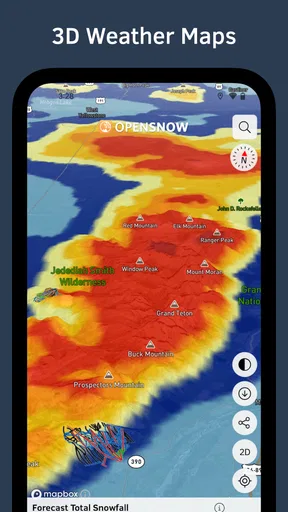
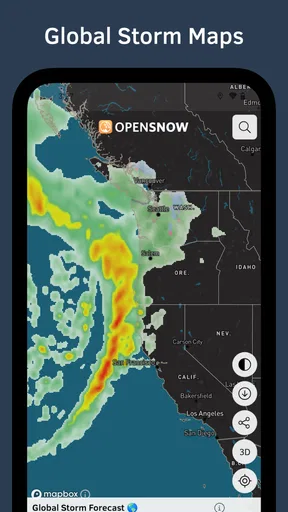
OpenSnow’s interactive map gives me another way to understand what a forecast means. Looking at a weather pattern spatially can be more intuitive than reading separate location summaries, particularly when I’m trying to understand whether conditions are approaching an area or affecting a wider region. Map layers can add context, but I’d use them selectively. Turning on several at once may make a screen busier without making the decision clearer; one useful layer is often better than a map crowded with information.
Alerts can reduce the need to reopen the app throughout the day, especially when I’m following a place I care about. I’d set them for a small number of locations and for changes that could genuinely alter my plans. Too many notifications turn a helpful forecast into background noise, and frequent alerts do not make the weather itself more predictable. A restrained setup is more likely to save attention: choose the places that matter, then check the app when an alert gives you a reason.
What community reports can—and can’t—tell you
Reports and photos from other users can offer a useful ground-level impression of conditions. They may help answer the kind of question a forecast can’t settle on its own, such as whether a place looks actively snowy or whether recent conditions match the broader outlook. I see these contributions as supporting evidence, not a substitute for a forecast or an official update. A report can be timely but still reflect one person’s location and experience, so I’d avoid treating a single post as a complete picture of a mountain.
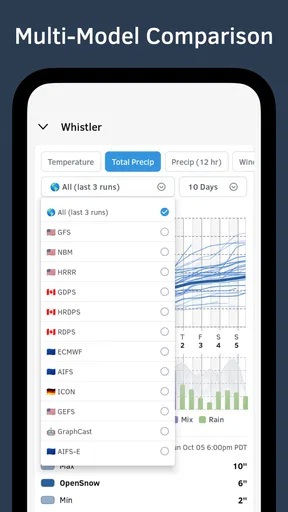
The same caution applies when comparing destinations. A side-by-side view is helpful because it puts options in one place, but a larger snowfall figure alone does not automatically make one resort the better choice. I’d weigh the expected conditions against travel time, the kind of day I want, and other practical constraints. The comparison is most valuable as a shortlist-making tool, not as an automatic ranking that can decide a trip for me.
Where this specialist approach earns its place
OpenSnow is an app in the weather category from Cloudnine Weather, Inc. It has a 3.9 average rating from around two thousand ratings, with more than a thousand written reviews, and has passed one hundred thousand installs. Those figures suggest an established audience, though they can’t tell me whether the app suits a particular person’s routine. The more important question is whether snow forecasts are something I check often enough to justify a dedicated tool.
The app is free to install and rated for Everyone, while optional in-app purchases range from $5.99 to $49.99 per item. I’d start with the free experience and decide whether I need anything beyond it before spending money. The current version is 7.2.0, and the minimum operating-system requirement is 11. If your phone runs an older system, that compatibility detail is worth checking before you plan to rely on the app.
Compared with a usual all-purpose weather app, OpenSnow’s advantage is its attention to snow and mountain planning. The trade-off is that a specialist app is not necessarily the best single source for every weather question. For general forecasts, severe-weather guidance, or road conditions, I’d use the appropriate local service as well. For someone who rarely visits snowy places, the extra focus may not repay the time spent setting up locations and learning the app. For a regular skier, snowboarder, or winter traveler, that setup is more likely to pay off when a forecast can change where or when the day happens.
Weather Forecasts Tailored for Snow Lovers
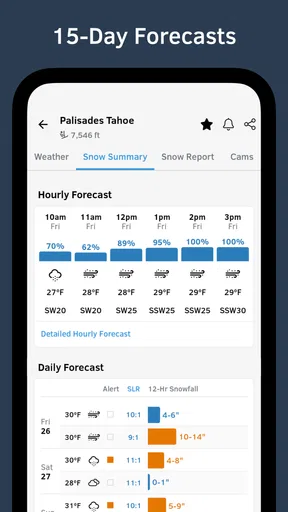
What sets OpenSnow apart from your everyday weather app is its laser focus on snow forecasts. Created by a team of meteorologists who are as passionate about powder days as you are, the app provides detailed, location-specific forecasts. Whether you’re planning a ski trip to the Rockies or just hoping for a snow day in your hometown, OpenSnow delivers precise details on snowfall amounts, temperatures, and wind conditions.
The interface is super user-friendly. After downloading the app, you can select your favorite locations and get real-time updates. The app also offers a "Daily Snow" feature, where a local forecaster provides insights and predictions tailored to your area. This is perfect if you're like me and prefer getting the scoop from someone who knows their stuff.
Interactive Maps and Alerts
One of my favorite features in OpenSnow is the interactive map. It’s incredibly satisfying to see live radar images of snowstorms rolling in. You can also toggle between different map layers such as snow depth and cloud cover, which is pretty neat if you're planning your next adventure.
And let’s talk about the alerts. Imagine dozing off and waking up to a notification that your favorite ski resort is expecting fresh powder overnight. Yes, it’s that good. The app lets you set customized alerts for your preferred locations, so you’re always a step ahead.
Community and Additional Features
OpenSnow isn’t just about forecasts. It’s a community of snow enthusiasts. The app has a section where users can share photos and conditions from their local slopes. This feature is fantastic for getting real-time reports from other users, which is often more reliable than official sources. Plus, it’s a great way to connect with fellow snow lovers.
Another cool feature is the "Compare" tool, which lets you stack up different ski resorts side-by-side. This is incredibly handy when you’re trying to decide where to hit the slopes next. You can compare snowfall totals, base depth, and even lift ticket deals. It’s like having a personal ski advisor in your pocket!
Ease of Use and Availability
The app is available for both iOS and Android, which is a big plus for accessibility. I found the installation process to be a breeze, and the app runs smoothly with minimal lag. Even when navigating between heavy data maps, everything loads quickly and efficiently.
If you’re a data geek like me, you’ll appreciate the additional charts and historical data available. It’s fascinating to look back at previous winters and compare snowfall patterns. It’s like being your own meteorologist!
Wrapping Up
All in all, I’d say OpenSnow is a must-download for anyone who lives for snow days. Whether you're planning a winter getaway or just want to be the first to know when the snow’s coming, this app delivers in spades. With its in-depth forecasts, interactive features, and vibrant community, it’s more than just an app—it’s your go-to guide for all things snow.
So, what are you waiting for? Grab your phone, download OpenSnow, and get ready to make the most of this winter season!
Privacy and Permissions
See what permissions an app requests and how it handles your data.
- Location
- approximate location (network-based), precise location (GPS and network-based)
- Photos/Media/Files
- read the contents of your USB storage
- Storage
- read the contents of your USB storage
- Wi-Fi connection information
- view Wi-Fi connections
- Other
- view network connections, full network access, run at startup, control vibration, prevent device from sleeping
Verdict
Strengths of OpenSnow
- Accurate snowfall predictions.
- User-friendly interface design.
- Customizable weather alerts.
- Interactive snow maps available.
- Detailed resort information.
Limitations of OpenSnow
- Limited free features.
- Occasional app crashes.
- Requires constant internet connection.
- Ads can be intrusive.
- Some forecasts lack detail.
Similar Picks in This Category
View All
Weather - By Xiaomi
Xiaomi Inc.4.1

Weather & Radar Forecast
WetterOnline4.8

Weather
OneLouder Apps4.6

AccuWeather: Weather Radar
AccuWeather3.6

The Weather Channel - Radar
The Weather Channel4.6

1Weather Forecasts & Radar
OneLouder Apps4.3
Frequently Asked Questions
What is OpenSnow, and how does it work?
OpenSnow is a weather forecasting app designed specifically for snow enthusiasts. It provides detailed snow forecasts, mountain weather conditions, and reports for ski resorts around the world. Users can access real-time updates, view snow predictions, and set custom alerts to stay informed about their favorite locations.
Is OpenSnow free to use, or does it require a subscription?
OpenSnow offers both free and premium versions. The free version provides basic weather forecasts and updates, while the premium subscription includes advanced features such as extended forecasts, hourly updates, and additional location tracking. Users can choose based on their needs and level of interest in detailed snow reports.
Which devices are compatible with OpenSnow?
OpenSnow is available for both Android and iOS devices. Users can download the app from Google Play Store for Android devices and the Apple App Store for iOS devices. The app is optimized for smartphones and tablets, providing a seamless experience across different screen sizes.
Can OpenSnow provide accurate forecasts for remote ski resorts?
Yes, OpenSnow is known for its accuracy in forecasting even for remote ski resorts. The app uses a combination of weather models, expert analysis, and local weather station data to deliver precise forecasts. Users can rely on OpenSnow for up-to-date snow conditions and mountain weather updates, regardless of location.
Does OpenSnow offer weather alerts and notifications?
OpenSnow provides customizable alerts and notifications to keep users informed about changing weather conditions. Users can set up alerts for specific locations, such as favorite ski resorts, and receive notifications about significant snowfall, weather changes, or other important updates. This feature helps users plan their trips effectively.
